07 Jun 2026
How to Recharge TikTok Coins with eSewa & Khalti in Nepal (2026)
Recharge TikTok Coins in Nepal using eSewa or Khalti. Complete guide with step-by-step instructions, payment proof tips, and verification process.
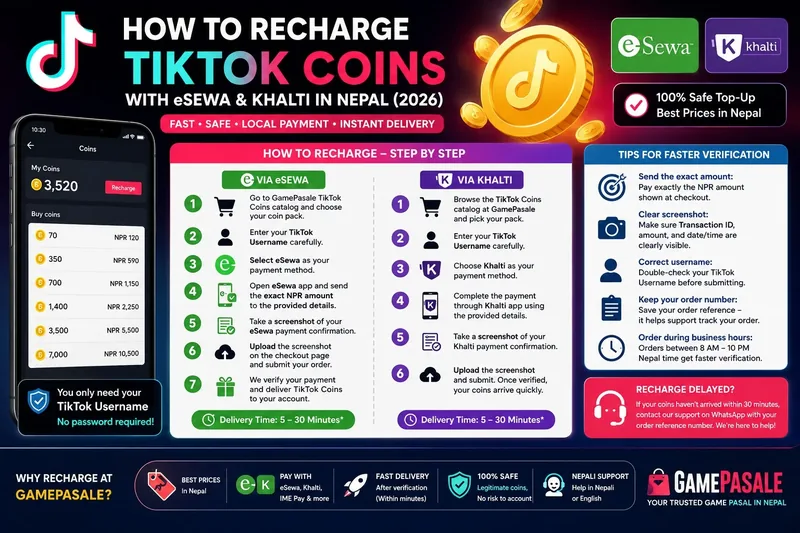
Recharging TikTok Coins in Nepal is simple when you use local payment methods like eSewa and Khalti. This guide walks you through the entire process – from choosing your coin pack to uploading payment proof and receiving your coins after verification.
Why Use eSewa or Khalti for TikTok Recharge?
eSewa and Khalti are Nepal's most popular digital wallets, used by millions of Nepalis daily. Here is why they are the best choice for TikTok Coin top-ups:
- No international transaction fees: International credit/debit cards charge 2-4% in foreign currency fees. eSewa and Khalti transactions are fully local in NPR – no hidden costs.
- Instant payment confirmation: Payments are processed immediately, so your order can move to verification right away.
- Easy screenshot proof: Both apps provide clear payment confirmation screens that are easy to screenshot and upload as proof.
- Widely available: If you are in Nepal, you almost certainly already have eSewa or Khalti set up.
How to Recharge TikTok Coins with eSewa
Step 1: Go to the GamePasale TikTok Coins catalog and choose your preferred coin pack.
Step 2: Enter your TikTok Username carefully – double-check for spelling mistakes.
Step 3: At checkout, select eSewa as your payment method.
Step 4: You will see the eSewa payment details (eSewa ID or QR code). Open your eSewa app and send the exact NPR amount shown.
Step 5: After completing the payment, take a screenshot of your eSewa confirmation screen. Make sure the transaction ID and amount are clearly visible.
Step 6: Upload the screenshot on the checkout page and submit your order.
Step 7: Our team verifies your payment proof. Once confirmed, TikTok Coins are delivered to your account – usually within minutes.
How to Recharge TikTok Coins with Khalti
Step 1: Browse the TikTok Coins catalog at GamePasale and pick your pack.
Step 2: Enter your TikTok Username – accuracy is critical to avoid delivery delays.
Step 3: At checkout, choose Khalti as your payment method.
Step 4: Complete the payment through the Khalti app using the provided details. Send the exact amount.
Step 5: Take a clear screenshot of your Khalti payment confirmation showing the transaction ID and amount.
Step 6: Upload the screenshot and submit. Once verified, your coins arrive quickly.
Tips for Faster Verification
- Send the exact amount: Pay exactly the NPR amount shown at checkout – not more, not less.
- Clear screenshot: Make sure the transaction ID, amount, and date/time are readable in your screenshot.
- Correct username: Double-check your TikTok Username before submitting. A wrong username causes delays.
- Keep your order number: Save your order reference – it helps support track your order if needed.
- Order during business hours: Orders placed between 8 AM and 10 PM Nepal time typically get faster verification.
What If Your TikTok Recharge Is Delayed?
If your coins have not arrived within 30 minutes of uploading proof, contact GamePasale support via WhatsApp with your order reference number. Common reasons for delay include unclear screenshots, mismatched amounts, or orders placed late at night. In most cases, the support team can resolve issues quickly.
GamePasale is your trusted Game Pasal — the #1 top-up store in Nepal for Free Fire Diamonds and PUBG UC. Buy Free Fire diamonds in Nepal online with eSewa or Khalti at cheap rates. Free Fire diamond top up Nepal eSewa at cheap rate — all packs from 100 diamonds to largest bundles. Keep your order reference handy for faster support.
Quick links
Popular top-up guides and price pages.