07 May 2026
How to Buy PUBG Mobile UC in Nepal using eSewa & Khalti (2026 Guide)
Looking to buy PUBG UC in Nepal? Learn how to top up PUBG Mobile UC using eSewa and Khalti safely with payment proof review at GamePasale.
If you’re a PUBG Mobile player in Nepal, you already know the struggle of trying to buy Unknown Cash (UC) without an international credit card. Whether you’re looking to upgrade to the latest A-Series Royale Pass or spin for that new upgradable gun skin, getting UC fast and securely is essential.
Fortunately, buying PUBG UC in Nepal has never been easier. Thanks to platforms like GamePasale, you can now top up your account fastly using local payment methods like eSewa, Khalti, and IME Pay.
In this 2026 guide, we’ll show you exactly how to top up your PUBG Mobile account safely, without ever needing to share your login password.
Why Choose GamePasale for PUBG UC in Nepal?
Before we jump into the steps, you might be wondering: Is it safe to buy UC from third-party websites?
The short answer is: Yes, if you use an official partner.
Many untrustworthy Facebook pages ask for your Facebook or Twitter login details to load UC. Never do this! Sharing your login details can lead to account theft or a 10-year ban from Tencent.
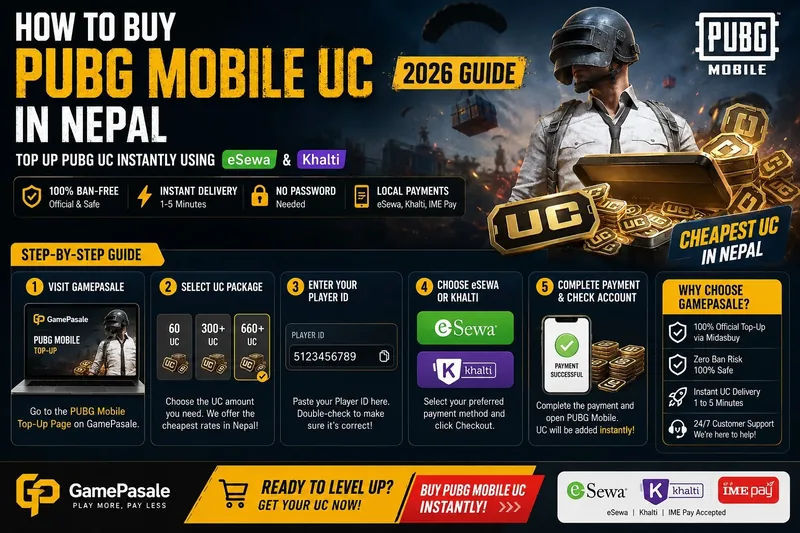
At GamePasale, we use the official Player ID Top-Up method (via Midasbuy integration). This means:
- Zero Ban Risk: The UC is 100% legal and official.
- No Passwords Needed: We only need your Player ID.
- Fast Delivery: Automated API delivery means the UC is in your account within 1 to 5 minutes after payment.
- Local Payments: We accept eSewa, Khalti, and Mobile Banking.
How to Find Your PUBG Mobile Player ID
To buy UC, you first need your unique Player ID. Here is how to find it:
- Open PUBG Mobile on your device.
- Tap on your Profile Avatar in the top-left corner of the main lobby.
- Look at the top of your profile card. You will see a string of numbers (e.g.,
5123456789). - Tap the small copy icon next to the numbers to copy your Player ID.
Step-by-Step Guide: How to Buy PUBG UC using eSewa
Once you have your Player ID, follow these simple steps to get your UC fastly:
Step 1: Visit GamePasale
Head over to the PUBG Mobile Top-Up Page on GamePasale.
Step 2: Select Your UC Package
Choose the amount of UC you want to buy. Whether you need just 60 UC for a daily spin or 660 UC for the Royale Pass, select the package that fits your needs. Our pricing table is updated daily to give you the clear rates in Nepal.
Step 3: Enter Your Player ID
Paste the Player ID you copied earlier into the text box. Double-check the numbers to make sure the UC goes to the right account!
Step 4: Choose eSewa or Khalti
Select your preferred payment method. When you click "Checkout", you will be securely redirected to the eSewa or Khalti payment gateway.
Step 5: Complete Payment & Check Your Account
Log in to your eSewa/Khalti account and confirm the payment. Once successful, open PUBG Mobile. You’ll see the UC added to your balance fastly!
Ready to Level Up?
Stop waiting around for manual top-ups. Experience the fastest automated game top-up service in Nepal today.
👉 Click here to Buy PUBG Mobile UC Fastly!
GamePasale is your trusted Game Pasal — the #1 top-up store in Nepal for Free Fire Diamonds and PUBG UC. Buy Free Fire diamonds in Nepal online with eSewa or Khalti at cheap rates. Free Fire diamond top up Nepal eSewa at cheap rate — all packs from 100 diamonds to largest bundles. Keep your order reference handy for faster support.
Quick links
Popular top-up guides and price pages.